Part 3 of 10
几乎所有 Claude Code 新手都会踩的坑:开始在项目上用它,结果一般般,然后就觉得它不行。但随后他们看到别人在类似的代码库上用出了惊艳的效果。差异在哪里?
配置。
一个配置到位的 Claude Code 会话,不仅理解你的代码——它理解你的模式、你的惯例、你团队的偏好。它知道你用 Bun 而不是 npm,API 路由放在 app/api/ 下,而且你的团队对错误处理有很强的主张。这一篇教你怎么搞定这些。
CLAUDE.md:你项目的记忆
CLAUDE.md 在 Claude Code 启动时会自动加载。把它想象成你在新开发者入职第一天交给他的操作手册——只不过 Claude 每次会话都会读它。
放在哪里
Claude Code 使用层级系统来加载 CLAUDE.md 文件:
项目根目录(最常见):
Your-project/CLAUDE.md
提交到 git。与团队共享。90% 的情况下你需要的就是这个。
替代位置:
Your-project/.claude/CLAUDE.md
效果一样,但能让你的项目根目录更干净。
全局(适用于所有项目):
~/.claude/CLAUDE.md
跟随你到处走的个人偏好。适合放「我偏好 tab 缩进」或「始终使用 TypeScript strict mode」这类内容。
本地变体(被 gitignore):
Your-project/CLAUDE.local.md
你不想提交的个人调整。API 密钥、实验性设置,或者你团队不认同的那种有争议的编码风格。
Monorepo 支持
这里就体现出设计的巧妙了。在 monorepo 中,你可能会有:
Monorepo/├── CLAUDE.md # 对所有内容生效├── apps/│ ├── web/│ │ └── CLAUDE.md # 在 web/ 中工作时加载│ └── api/│ └── CLAUDE.md # 在 api/ 中工作时加载└── packages/└── shared/└── CLAUDE.md # 在 shared/ 中工作时加载
当你从 monorepo/apps/web 运行 claude 时,根目录的 CLAUDE.md 和 web 专用的那个都会被加载。子目录的 CLAUDE.md 文件在你处理该目录中的文件时会按需加载。
CLAUDE.md 里写什么
一份好的 CLAUDE.md 回答三个问题:
WHAT(是什么) — 这个项目是什么?技术栈是什么?目录结构是怎样的?
WHY(为什么) — 目的是什么?解决什么问题?关键的业务概念是什么?
HOW(怎么做) — 怎么在上面工作?什么命令跑测试?部署流程是什么?如何验证改动?
实用模板
# Project Name一句话:这是什么,做什么。## Tech Stack- Next.js 14 (App Router)- TypeScript (strict mode)- Tailwind CSS- Prisma + PostgreSQL- Jest for testing## Directory StructureSrc/├── app/ # Next.js routes├── components/ # Reusable UI components├── lib/ # Utilities and helpers├── services/ # Business logic└── types/ # TypeScript interfaces## Commands- `bun dev` - Start development server (port 3000)- `bun test` - Run Jest tests- `bun lint` - ESLint check- `bun build` - Production build- `bunx prisma studio` - Database GUI## Coding Conventions- Use path aliases (@/components, @/lib, @/services)- Server components by default, 'use client' only when needed- All functions must have typed parameters and return types- Keep methods small with single responsibility- Tests colocated with components (Component.test.tsx)## Important Notes- Never commit .env files- Run `bunx prisma generate` after schema changes- API routes use Zod for runtime validation- Authentication uses NextAuth with JWT strategy
框架特定示例
Next.js App Router:
## Next.js Conventions- Server Components by default- Use 'use client' only for useState, useEffect, event handlers- Data fetching: direct DB calls in Server Components, SWR in Client- API Routes: app/api/[route]/route.ts- File naming: PascalCase components, camelCase utilities
Python FastAPI:
## FastAPI Conventions- Type hints on all functions- Async/await for I/O operations- Pydantic v2 models for request/response validation- Dependency injection for services- Alembic for migrations: `alembic upgrade head`
Go:
## Go Conventions- Standard project layout (cmd/, internal/, pkg/)- Use interfaces for testability- Error wrapping with fmt.Errorf and %w- Tests in same package with _test.go suffix- Run `go test ./...` before commits
Import 系统
CLAUDE.md 文件可以使用 @path/to/file 语法导入其他文件。这让你的主文件保持精简,同时仍然提供全面的上下文。
# Project OverviewSee @README.md for detailed project description.See @docs/api-patterns.md for API conventions.See @docs/testing-guide.md for testing requirements.## Quick Reference@package.json shows available npm scripts.
Import 的工作原理:
- 相对路径从 CLAUDE.md 文件所在位置解析
- Import 可以递归(最多 5 层深度)
- 代码块内的内容会被排除(``` 内的 import 不会被解析)
- 后面的 import 优先级高于前面的
用 rules 目录来组织:
对于大型项目,你可以把指令拆分到多个文件中:
.claude/├── CLAUDE.md # 主文件└── rules/├── coding-style.md├── testing.md├── security.md└── deployment.md
.claude/rules/ 中的所有 .md 文件会作为项目记忆自动加载。
# 键快捷方式
这是大多数人不知道的效率技巧:在任何 Claude Code 会话中,按 # 键就能即时添加指令到你的 CLAUDE.md。
发现自己在重复同一条指令?按 # 把它永久添加进去。Claude 下次就会记住了。
Settings.json:权限与自动化
除了 CLAUDE.md,你还可以通过 settings 文件配置 Claude 的行为。
文件位置
~/.claude/settings.json # 全局(所有项目).claude/settings.json # 项目级(提交到 git).claude/settings.local.json # 本地(被 gitignore)
设置按优先级合并:本地 > 项目 > 全局。
权限配置
控制 Claude 可以在不询问的情况下做什么:
{"permissions": {"allow": ["Read(./src/**)","Read(./tests/**)","Bash(git status)","Bash(git diff)","Bash(bun test:*)","Bash(bun lint)"],"deny": ["Read(./.env)","Read(./.env.*)","Read(./secrets/**)","Bash(rm *)","Bash(git push *)"]}}
规则评估方式:
- 先检查 deny 规则(无论其他规则如何,直接拦截)
- 然后检查 allow 规则(匹配则放行)
- 其他所有操作都需要手动批准
Deny 列表是你的安全边界。匹配 deny 模式的文件对 Claude 完全不可见——它甚至不知道这些文件存在。
Hooks:自动化操作
Hooks 在 Claude 生命周期的特定节点运行命令:
PreToolUse — Claude 使用工具之前(可以拦截操作)
PostToolUse — 工具完成之后(非常适合自动格式化)
SessionStart — 会话开始时(环境初始化)
Notification — Claude 发送通知时
Stop — Claude 完成回复时
示例:编辑后自动格式化 Python 文件:
{"hooks": {"PostToolUse": [{"matcher": "Write","hooks": [{"type": "command","command": "if [[ \"$CLAUDE_FILE_PATH\" == *.py ]]; then black \"$CLAUDE_FILE_PATH\"; fi"}]}]}}
示例:阻止修改生产环境配置:
{"hooks": {"PreToolUse": [{"matcher": "Write(./config/production.*)","hooks": [{"type": "command","command": "echo 'Blocked: Cannot modify production config' && exit 1"}]}]}}
提示: 你也可以在会话中使用
/hooks命令交互式配置 hooks。
团队配置
对于团队,以下是应该提交和应该 gitignore 的内容:
提交这些(与团队共享):
CLAUDE.md— 每个人都应遵循的项目指令.claude/settings.json— 共享的权限和 hooks.claude/rules/— 组织好的指令文件.claude/commands/— 团队自定义斜杠命令(详见第4篇)
Gitignore 这些(个人使用):
CLAUDE.local.md— 你的个人偏好.claude/settings.local.json— 你的本地覆盖
这让团队可以强制执行标准,同时个人可以自定义自己的体验。
真正重要的最佳实践
保持精简
研究表明,前沿 LLM(大语言模型)能可靠遵循大约 150-200 条指令。超过这个数量,遵循率就会下降。较小的模型能处理的更少。
不要这样做:
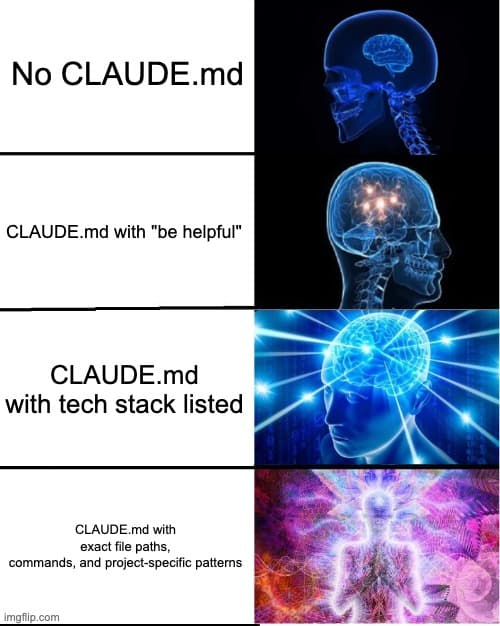
## General Guidelines- Write clean code- Follow best practices- Use meaningful variable names- Keep functions small
Claude 已经知道这些了。你在把宝贵的指令空间浪费在通用建议上。
应该这样做:
## Project-Specific Rules- Error responses use the ApiError class from @/lib/errors- All dates stored as UTC, displayed in user's timezone- Feature flags checked via @/lib/features.isEnabled()- Log format: [LEVEL] [SERVICE] [REQUEST_ID] message
只写你项目独有的内容。
像调 Prompt 一样迭代
你的 CLAUDE.md 是 Claude prompt 的一部分。像对待 prompt 一样对待它。
- 测试指令是否真的改变了行为
- 对关键规则加强调:「IMPORTANT:」或「YOU MUST」
- 删除没有被遵循的指令
- 偶尔把它丢给 Claude 的 prompt 优化器跑一遍
在 Anthropic 内部,他们调 CLAUDE.md 文件的方式和调 prompt 一模一样——基于实际效果持续迭代。
用 /init 作为起点
运行 /init 会通过分析你的项目来生成一份 CLAUDE.md。但它只是起点,不是成品。
自动生成的版本能捕获明显的模式(技术栈、目录结构、常用命令),但会遗漏你团队的隐性知识(tribal knowledge)。审查 Claude 生成的内容,然后补充对你实际工作方式最重要的部分。
在重大功能或重构之后再次运行 /init,让它捕获新的模式。
测试你的配置
设置好 CLAUDE.md 后,验证它是否生效:
Claude
然后问:
Summarize the project configuration and conventions you understand.What tech stack is this? What commands should you use for testing?
如果 Claude 遗漏了重要的内容,说明你的 CLAUDE.md 还需要完善。
下一步
你现在知道如何为你的特定项目配置 Claude Code 了。但配置只能走到这里——真正的威力来自用自定义命令扩展 Claude。
在 第4篇:自定义命令 中,我们将构建斜杠命令,把你的工作流编码成可复用的操作。把它想象成教 Claude 你团队的快捷方式。
文件位置
CLAUDE.md — 项目根目录(推荐)
.claude/CLAUDE.md — 替代位置
~/.claude/CLAUDE.md — 全局
CLAUDE.local.md — 本地(被 gitignore)
.claude/rules/ — 额外的规则文件
Settings 文件
.claude/settings.json — 项目级
.claude/settings.local.json — 本地覆盖
~/.claude/settings.json — 全局
核心功能
@path/to/file — Import 语法
# 键 — 会话中添加指令
/init — 生成/更新 CLAUDE.md
/hooks — 配置 hooks
Stay Updated
Get notified about new posts on automation, productivity tips, indie hacking, and web3.
No spam, ever. Unsubscribe anytime.